Create your account
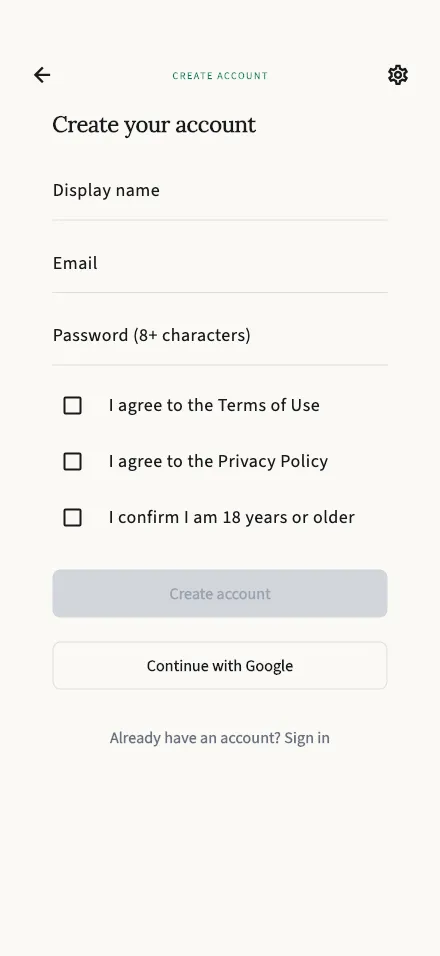
Sign up with your name, email, and a password, and agree to the Terms of Use and Privacy Policy.
In-app route: /register
Do I need an account?
Section titled “Do I need an account?”Not to get started. TalkStik works the moment you open it — you can hold sessions, read your reports, and build up a history without signing up for anything.
Creating an account is how you keep that history yours. With an account you can:
- Keep your sessions and reports if you switch phones or reinstall the app
- Sign back in from any device with your email and password
- Upgrade your plan — a paid plan needs an account it can belong to
Creating your account
Section titled “Creating your account”- Enter a display name — the name your session partner sees.
- Enter your email address.
- Choose a password of at least 8 characters.
- Tick the three boxes: the Terms of Use, the Privacy Policy, and confirmation that you are 18 or older. TalkStik is for adults only, so all three are required.
- Tap Create account.
You can also continue with Apple or Google instead of a password — you’ll be asked to accept the same terms the first time.
Everything you’ve already done in the app comes with you. Creating an account upgrades the guest profile you’ve been using, so your past sessions and reports stay exactly where they are.
After you sign up
Section titled “After you sign up”We send a verification email to the address you entered. You can keep using TalkStik right away — verifying just confirms the address is really yours. If the email doesn’t arrive, you can resend it from your profile.
Something not working?
Section titled “Something not working?”- “This email is already registered. Try signing in instead.” — you (or someone) already created a TalkStik account with this address. Head to Sign in.
- The Create account button stays greyed out — check that every field is filled in, your password is at least 8 characters, and all three boxes are ticked.