Start a session
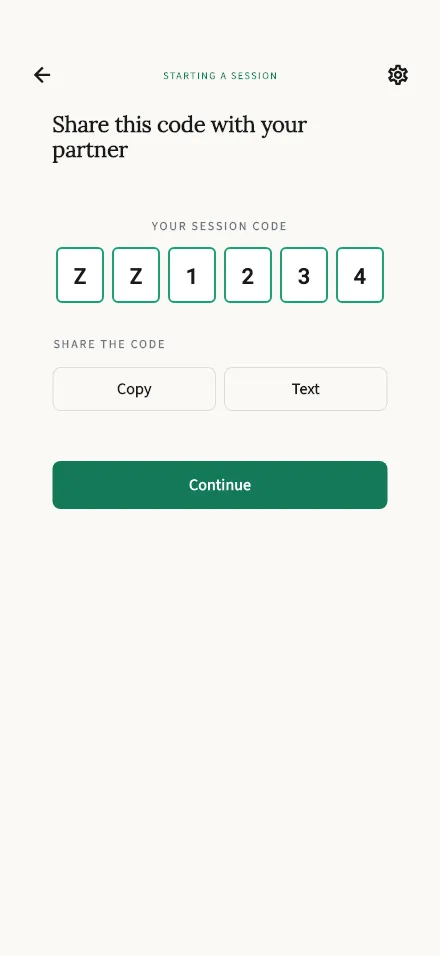
Creates your session and shows the 6-character code to share with your partner.
In-app route: /start/host
Starting a session
Section titled “Starting a session”You reach this screen after telling TalkStik that your partner is with you. That is the point at which the session is created, and it happens the moment this screen opens, with no extra button. Until you answer that question, no session and no code exist at all.
You’ll see your session code: 6 characters your partner enters on their phone to join you.
- Since you’re in the room together, the simplest thing is to hold up your phone and let them read the code off the screen.
- Tap Copy to put it on your clipboard (the button flips to Copied!), or Text to open Messages with it, if they’d rather have it on their own phone.
- As the person who started the session, you’ll speak first once you’re both in.
When your partner has the code, tap Continue. You’ll both confirm a short consent step, and then the session begins.
Something not working?
Section titled “Something not working?”- “Failed to create session.” — usually a connection hiccup. Check your internet and try again from the welcome screen.
- Partner can’t join? Double-check the code together, or start a fresh session and share the new code. Starting again takes you back through the “is your partner with you” question first. See Join a session for what they see on their side.
- Partner isn’t with you after all? Back out and start again when you’re together. Nothing is lost by doing that, and a session you never used costs you nothing.